Introduction to Email Marketing Automation with n8n
Email marketing automation has become a cornerstone for businesses looking to enhance their customer engagement and drive sales efficiently. With the advent of platforms like n8n, integrating advanced automation workflows into your marketing strategy has become more accessible than ever. n8n, an open-source workflow automation tool, empowers marketers to create complex automation sequences without the need for extensive coding skills. This blog post will delve into the intricacies of email marketing automation with n8n, exploring the benefits, key features, implementation strategies, and best practices to optimize your marketing efforts.
Why Email Marketing Automation Matters
Before diving into the specifics of n8n, it’s essential to understand why email marketing automation is indispensable for modern businesses. Automation allows for the creation of personalized, timely, and scalable communication with your audience. Some of the key reasons include:
- Increased Efficiency: Automating repetitive tasks like sending welcome emails, follow-up messages, or campaign updates saves valuable time for marketers and allows them to focus on strategic decisions.
- Personalization at Scale: With automation, you can tailor messages to individual customer preferences and behaviors, ensuring each recipient receives content that resonates with them.
- Higher Conversion Rates: By delivering the right message at the right time, automation boosts engagement and increases the likelihood of conversions.
- Improved Customer Retention: Consistent communication through automated workflows helps maintain customer interest and loyalty over time.
Understanding n8n: An Open-Source Powerhouse
n8n is a versatile open-source tool designed to streamline complex workflows by co
ecting different APIs and automating repetitive tasks. With n8n, marketers can integrate their preferred email marketing platforms (such as Mailchimp, SendGrid, or HubSpot) with other data sources and create intricate automation sequences. Here’s what makes n8n stand out:
- Open-Source Flexibility: Being open-source means n8n is free to use, customizable, and continuously updated by a community of developers.
- Extensive Integration Capabilities: n8n supports a wide range of integrations, allowing marketers to co
ect their favorite tools without additional costs. - Advanced Workflow Customization: The ability to build custom workflows with conditional logic, triggers, and actions empowers marketers to tailor their automation strategies to specific business needs.
Key Features of n8n for Email Marketing Automation
To harness the full potential of n8n for email marketing automation, it’s crucial to understand its core features. Here’s a breakdown of what n8n offers:
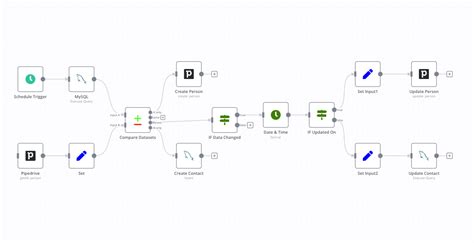
- Trigger-Action Logic: n8n allows users to set up workflows based on specific triggers, such as a new subscriber signing up or a customer making a purchase, and then execute corresponding actions like sending an email or updating a database.
- Conditional Logic: With n8n, you can incorporate conditional statements into your workflows, enabling personalized actions based on specific criteria (e.g., sending different emails based on user behavior or preferences).
- Data Transformation: n8n supports data manipulation, allowing marketers to clean, format, or enrich data before it reaches the destination platform.
- Error Handling and Logging: n8n provides robust error handling and logging capabilities, helping marketers troubleshoot issues and ensure smooth workflow execution.
Step-by-Step Implementation of n8n for Email Marketing Automation
Implementing n8n for your email marketing automation strategy involves several key steps. Here’s a detailed guide to get you started:
- Set Up Your n8n Instance: Begin by installing and configuring your n8n instance. You can opt for a cloud-hosted version or deploy it on your local server, depending on your preferences and infrastructure.
- Integrate Your Email Marketing Platform: Co
ect your preferred email marketing platform (e.g., Mailchimp, Constant Contact) to n8n using the available API integrations or webhooks. - Define Your Workflow Triggers: Identify the specific events or actions that will initiate your automation workflows. Common triggers include user sign-ups, email opens, or purchase completions.
- Set Up Workflow Actions: Define the corresponding actions for each trigger, such as sending a welcome email, adding a subscriber to a list, or updating a CRM entry.
- Add Conditional Logic and Filters: Incorporate conditional logic to tailor your workflows further. For instance, you can set up logic to send different messages to different user segments based on their behavior or preferences.
- Test Your Workflow: Before rolling out your automation, test the entire workflow to ensure it functions as expected. Adjust settings as needed based on the test results.
- Monitor and Optimize: Once live, monitor the performance of your automation workflows. Use analytics to gauge effectiveness and make adjustments to improve engagement and conversions.
Best Practices for Maximizing n8n Email Marketing Automation
To ensure your n8n-driven email marketing automation delivers the best results, adhere to these best practices:
- Personalize Content: Use data-driven insights to create personalized content that aligns with your audience’s interests and behaviors.
- Segment Your Audience: Divide your audience into segments based on demographics, behavior, or preferences to ensure targeted messaging.
- Consistency and Timing: Schedule your emails at optimal times based on audience behavior to maximize open rates and engagement.
- Regularly Review and Adjust: Continuously review the effectiveness of your automation workflows and make necessary adjustments to adapt to changing customer behaviors or business goals.
Real-World Applications of n8n in Email Marketing Automation
To better understand the practical benefits of n8n, let’s explore some real-world applications across different industries:
- E-commerce: In e-commerce, n8n can automate abandoned cart emails, post-purchase follow-ups, or personalized product recommendations based on user activity.
- Lead Generation: For lead generation campaigns, n8n can trigger automated follow-up emails based on user engagement with content or form submissions.
- Content Marketing: Content marketers can use n8n to automate distribution of blog posts or newsletters to subscribers, enhancing content engagement.
- Customer Support: Customer support teams can leverage n8n to automate onboarding emails or support resources for new users.
Comparing n8n with Other Automation Tools
While n8n offers a unique set of capabilities, it’s important to compare it with other popular automation tools to determine the best fit for your business needs. Here’s a quick comparison:
| Tool | Open Source | Integration Capabilities | Cost | Customization Options |
|---|---|---|---|---|
| n8n | Yes | Extensive | Free | High |
| Zapier | No | Wide range | Subscription-based | Moderate |
| Make (Integromat) | No | Advanced | Subscription-based | Advanced |
n8n’s open-source nature and extensive integration capabilities make it a compelling choice for marketers seeking flexibility and control without additional costs.
Troubleshooting Common Issues with n8n Email Automation
Despite its robust features, users may encounter some common issues when implementing n8n for email marketing automation. Here’s how to address them:

- Co
ection Issues: If you experience problems co
ecting to your email marketing platform, verify the API credentials and ensure the integration is correctly configured. - Workflow Delays: Workflow delays can be resolved by checking the scheduling settings or adjusting the trigger intervals to align with expected timelines.
- Error Logging: For persistent errors, consult the error logs within n8n to identify the root cause and apply the appropriate fixes.
Future Trends in Email Marketing Automation with n8n
As the digital landscape evolves, so too does the role of email marketing automation. Here are some future trends that marketers should watch for:
- AI-Driven Personalization: Integration of AI tools to enhance personalization at scale will become more prevalent, allowing marketers to deliver even more tailored content.
- Advanced Analytics: The use of advanced analytics to measure campaign effectiveness and optimize automation strategies will become a standard practice.
- Cross-Cha
el Automation: Expect to see more integration of email marketing automation with other communication cha
els like SMS, social media, and web push notifications.
Conclusion
Email marketing automation with n8n presents a powerful opportunity for businesses to streamline their marketing efforts, improve engagement, and boost conversions. By leveraging n8n’s open-source flexibility, extensive integration options, and advanced workflow customization, marketers can create sophisticated automation sequences tailored to their specific needs. Whether you’re an e-commerce brand, a lead generation team, or a content marketer, adopting n8n for your email marketing automation strategy can yield significant benefits. Stay ahead of the curve by embracing the latest trends and best practices, and continue refining your workflows to adapt to evolving customer expectations. With n8n, the possibilities for enhancing your marketing automation are limitless.

